Federated Learning Nodes
FLIP supports two federated learning frameworks: NVFLARE and Flower AI. In both settings, the minimum components are:
FL server: orchestrates the training process across sites and performs the aggregation of weights. It also uploads results at the end of the training.
FL client: performs local training on the data at each site and sends the weights to the server.
FL API: launches the training and acts as interface between the other FL components and the Central Hub API.
The FL API and Server are hosted at the Central Hub (in the Cloud), while client nodes are launched in the sites participating in a specific project (Cloud or on-premise).
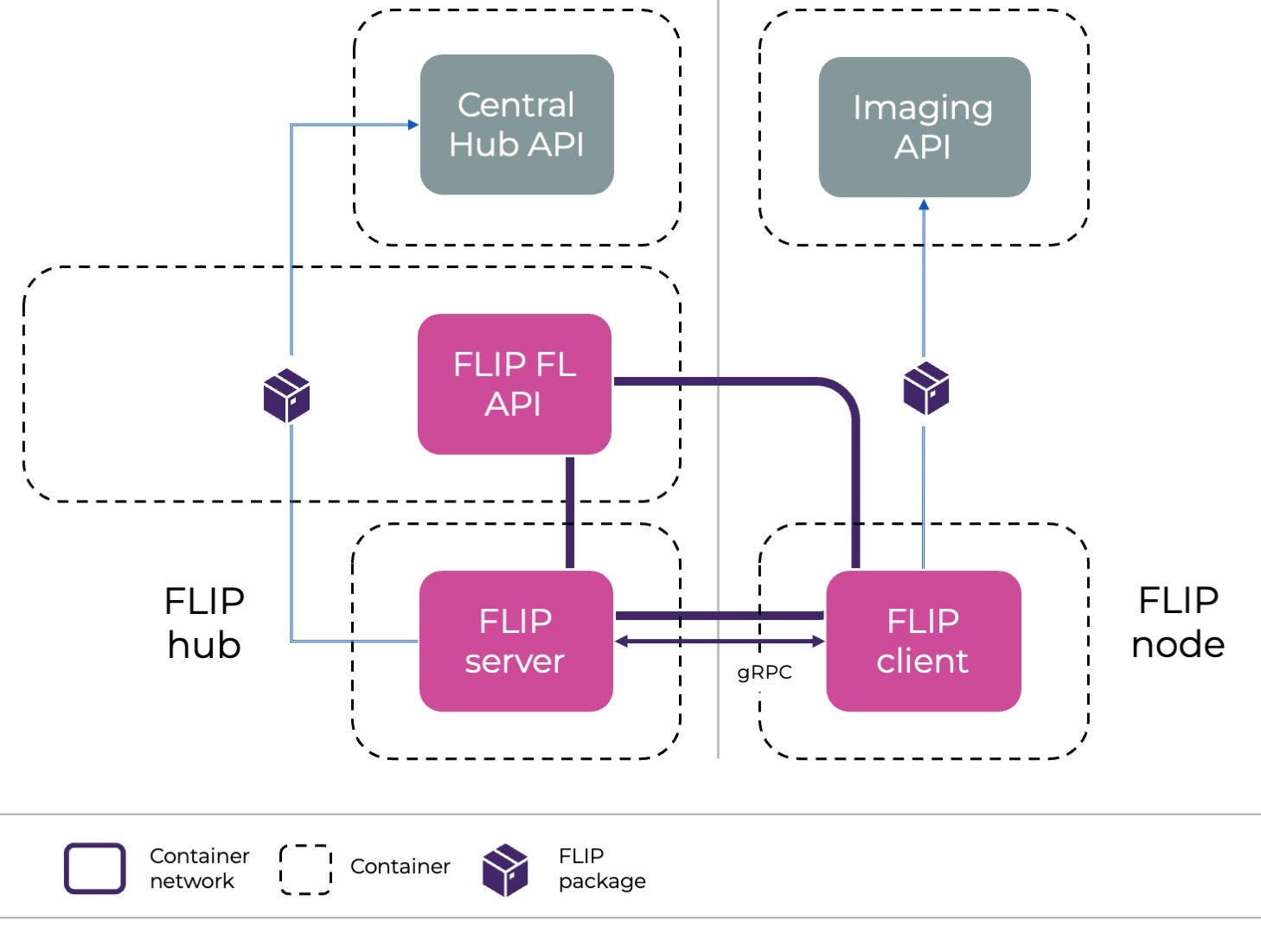
Depiction of the FL nodes and the services they communicate with.
Only the client will be running deep learning training, and therefore, requires access to GPU units.
Job types
Due to security restrictions, FLIP users are not allowed to control what happens on the server side.
Although most adjustable aspects of machine learning training happen on the client side
(e.g. dataloading, training loop, model architecture), FLIP provides different job types
that the user can choose based on their needs.
Currently, these job types include federated averaging (job type standard),
evaluation task (job type evaluation), federated optimisation (job type fed_opt)
and diffusion model training (job type diffusion_model), which covers multi-stage federated training.
For NVFLARE, two further job types drive the client code through the modern NVFLARE Client API
(a plain training/evaluation script using nvflare.client instead of a class-based Executor):
federated averaging (job type standard_client_api) and model evaluation (job type evaluation_client_api).
More job types will be added in the future, adjusting to the community’s needs.
How to choose a job type?
A federated learning job is an ensemble of files (among which we can find python, json or toml files) we call an app. Some of these files are required to run the app (for instance, the pyproject.toml file in a Flower app), and some are optional.
The job type is passed as key job_type in the config.json file (for both NVFLARE and Flower apps).
Once uploaded, the UI will indicate which files are required for the specific job.
Then, the Central Hub API will take care of bundling together: - The files the user has uploaded - The static (non-modifiable) files that are required for the specific job type.
For more information about currently supported apps, see the per-job-type implementations under
fl-apps/ (standard, evaluation,
diffusion_model, fed_opt, standard_client_api, evaluation_client_api).
Examples of how the same job type (standard -> federated averaging) can run different user-uploaded applications are:
Both cases perform a supervised federated averaging training, but the data, architecture and training configuration are different.
The NVFLARE Client API job types have their own tutorials:
xray_classification_client_api (job type standard_client_api)
3d_spleen_segmentation_evaluation_client_api (job type evaluation_client_api)
These tutorials run on the local NVFLARE simulator from the repo root — e.g.
make -C fl-tutorials run-tutorial TUTORIAL=xray_classification (requires a GPU and the
flare-fl-base image; see the
fl-tutorials/ README).
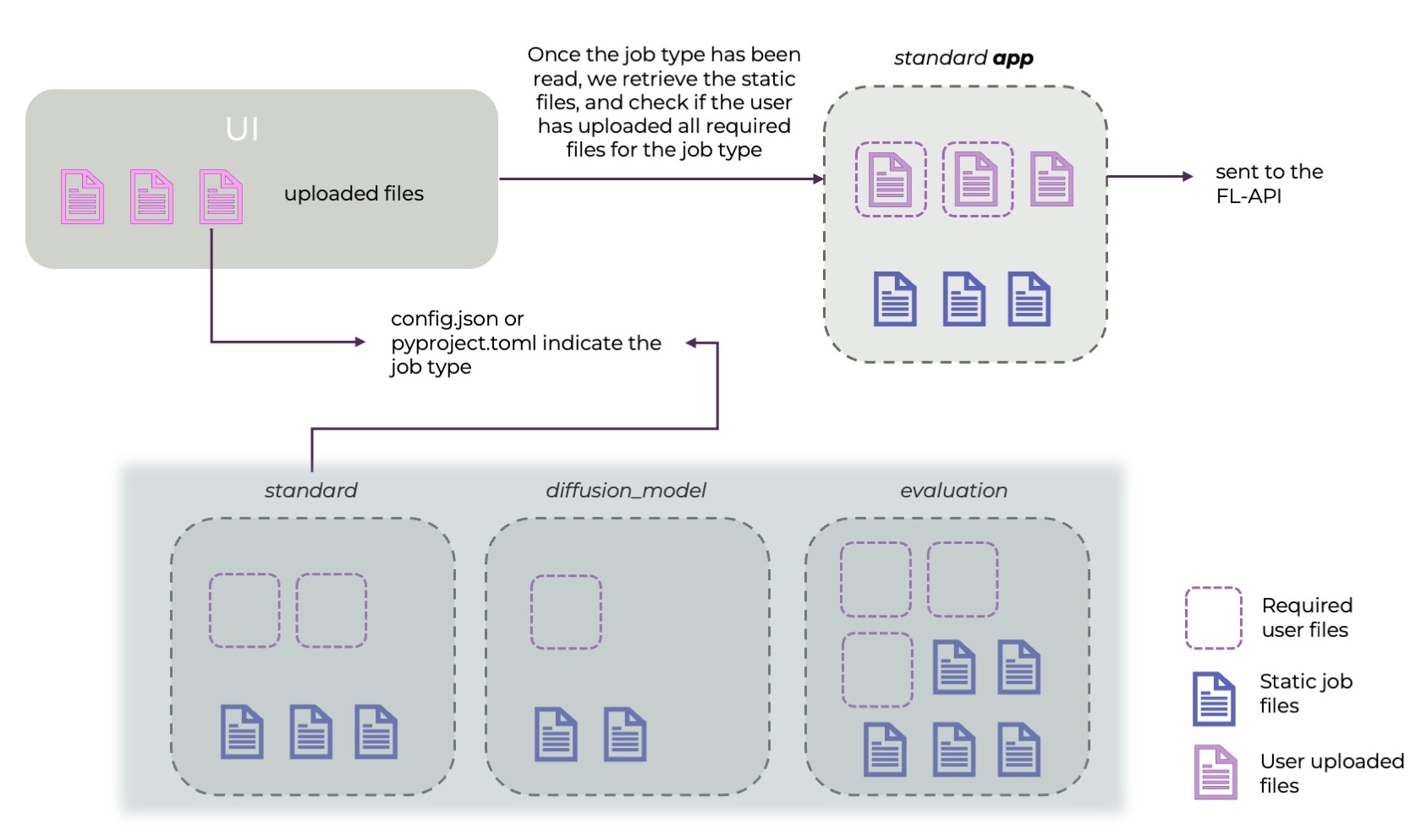
Workflow of how the user uploads files for a specific job type.
Data access and communication with external services
Though the user is allowed to upload the training script that will run on the client side, the access to data will have to be via the FLIP package (see https://github.com/londonaicentre/FLIP/tree/develop/flip-utils/flip). This package, installed by default in client and server nodes, will make a series of functions available to the user.
For data access:
- flip.get_dataframe(project_id, query): retrieves the dataframe linked to the project ID and query that have been used on the project.
- flip.get_by_accession_number(project_id, accession_id, resource_type): retrieves data of a certain type (e.g. NIFTI) associated with an accession ID. resource_type defaults to ResourceType.NIFTI and can be a single type or a list.
These calls - among others - communicate with the Imaging API and retrieve the data from the project’s XNAT.
For communication with the Central Hub:
- flip.update_status(model_id, new_model_status): these calls will update the Central Hub about status on the specific model that is running (example: when it started training, or if there’s an error).
- flip.send_metrics(client_name, model_id, label, value, global_round, x_value=None, x_label=None): sends a metric to the central hub so that it can plot the training results. global_round is provenance — always the FL global round the metric is reported in. Where the point is plotted is the optional coordinate pair: x_value is the x-coordinate (any float, e.g. an epoch counter) and x_label names the x-axis (e.g. "epoch"); both default to the global round on the “Global Rounds” axis. A plot is identified by the (label, x_label) pair, so the same metric logged against different x-labels is shown as separate plots.
- flip.send_event(model_id, event_type, global_round, …): sends a typed round-progress fact to the Central Hub — one of ROUND_STARTED, CLIENT_RESULT_RECEIVED (with the serialized update size in details.size_bytes) or ROUND_AGGREGATED (with returned/expected counts). The hub composes the display text shown in the model page’s Live activity feed at serve time, so wording changes ship with a flip-api redeploy and never require rebuilding FL images. Rounds are 1-based on both backends.
The fl-server emits these events automatically — NVFLARE via the FLIP ScatterAndGather/ServerEventHandler components (wired by path in each template’s server config, so no app-template changes were required), Flower via the flip.flower.strategy.FlipFedAvg base strategy the app templates subclass. User training code never calls send_event directly. Pre-existing Flower apps (whose uploaded strategy subclasses stock FedAvg) keep working and simply emit no round telemetry; pre-existing NVFLARE apps reference the FLIP components by path from the baked flip package, so they start emitting as soon as the fl-server image carries this version — with no app change.
Note the reported upload sizes measure slightly different things per backend — NVFLARE sums the in-memory tensor sizes of the client’s (possibly partial) weight update, Flower sums the serialized array buffers — each internally consistent within a run.
The server will also use the package to update the status, as well as to upload the final results, which will be first saved in the server, to the final S3 buckets users can download from.
Disclaimer: some things are still under construction!
There are currently some elements that are still under construction, and might not adjust exactly to the description above:
for the Flower framework, users have to upload the server_app.py in addition to the client_app.py and additional auxiliary code, but in the future, this will not be the case.
for the class-based NVFLARE job types (standard, evaluation, fed_opt, diffusion_model) the user upload is intentionally minimal — trainer.py / validator.py / models.py / config.json — and the rest of the app is filled in from the static (non-modifiable) templates baked into the flip-api image at FL_APP_BASE_DIR (fl-apps/, see FLIP#724). These templates used to be published to an S3 bucket; that path has been removed. You can check what a fully bundled app looks like by consulting the per-job-type implementations under fl-apps/.
the modern NVFLARE Client API job types (standard_client_api, evaluation_client_api) instead let the user upload a plain training/evaluation script that calls
nvflare.clientdirectly. Over time, more job types will migrate to this recipe-driven model.